.webp)
Introduction
Meal-planning apps need three data layers: a product catalog (names, brands, pack sizes, UPCs), live prices by store/ZIP, and availability. Your options are official retailer APIs (rarely open, limited coverage), DIY scraping (works at prototype scale, breaks constantly at production scale), or a managed data provider (one API, matched SKUs across retailers, no maintenance). This guide covers what each path really costs — in money and in engineering weeks.
The pattern is always the same. A founder builds a beautiful meal-planning app: recipes in, shopping list out. Then a user asks the obvious question — "what will this week's plan cost me at my store?" — and suddenly the roadmap has a data problem bigger than the app itself. We talk to founders at this exact moment every week. Here's the honest map of the territory.
What data does a meal-planning app actually need?
four layers, and most founders underestimate two of them.
Product catalog
canonical product records: name, brand, pack size, UPC/barcode, category, image. This is your
foundation; without clean pack sizes, "2 cups flour" can't map to a real product.
Live pricing by location
US grocery pricing is store- or ZIP-level, not national. The same retailer prices differently
across regions, so "Walmart price" without a ZIP is fiction.
Availability
a perfectly priced item that's out of stock ruins the shopping list. Availability is the most
volatile layer and the most commonly skipped.
Nutrition & allergens (if your app is diet-aware)
calories, macros, allergen flags per product, which also unlocks premium features.
Option 1: Official retailer APIs
A handful of US retailers expose product/price APIs, mostly designed for affiliates or their own partner ecosystems. Coverage is the killer: your users shop at Kroger and Walmart and a regional chain, and no official-API path covers all three consistently. Terms also frequently restrict price display, caching or comparison use cases — read them carefully before building a comparison feature on top.
Option 2: Build your own scrapers
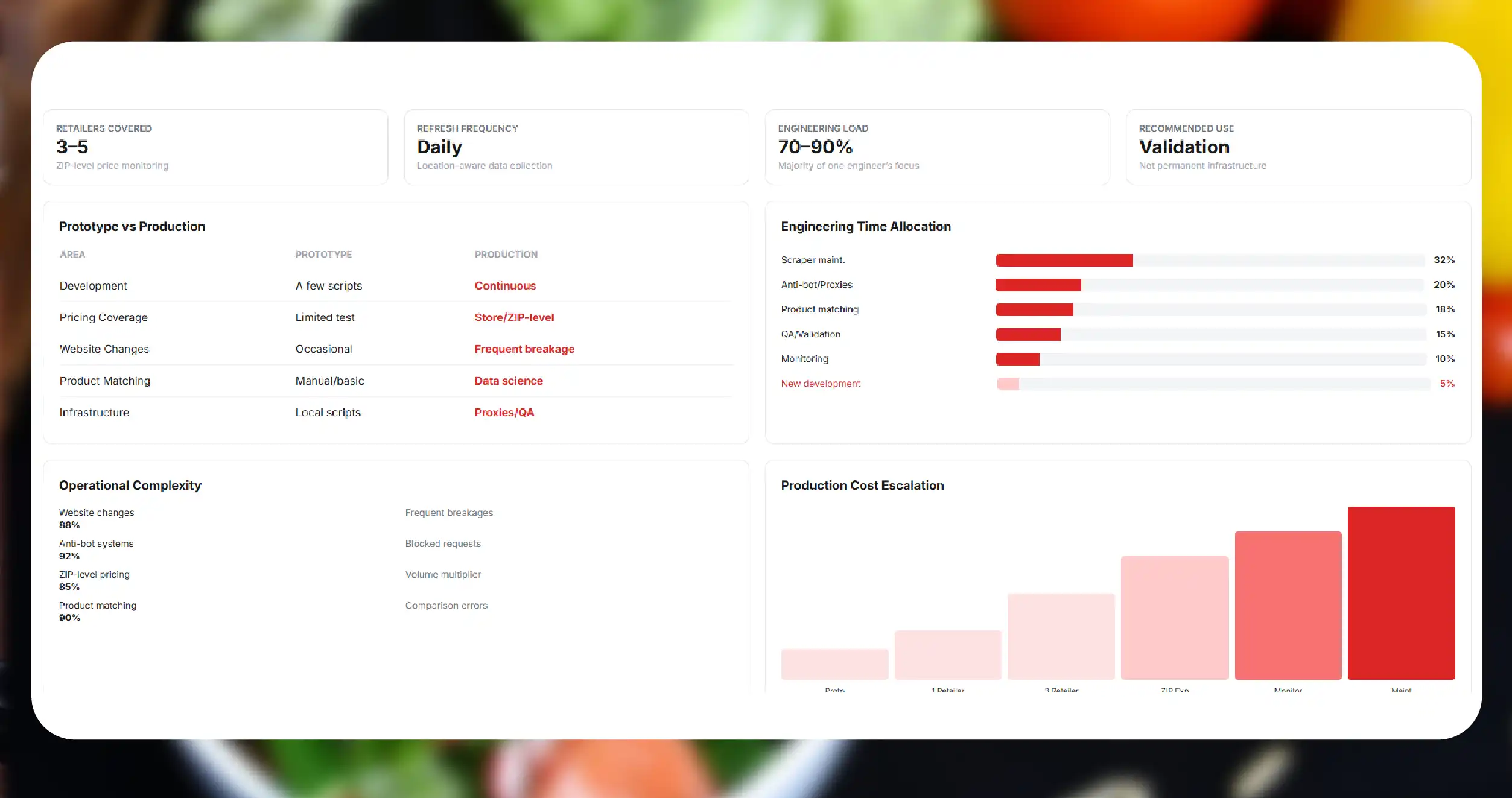
At prototype scale, this feels free. A developer writes a few scripts, prices flow, the demo works. Then production arrives:
- Retail sites change layouts and anti-bot systems continuously; every change is a 2 a.m. breakage.
- Store/ZIP-level pricing means your scraper needs location context per request — multiplying volume and complexity.
- Product matching across retailers (the same SKU with different titles) is a data-science problem, not a scraping problem.
- Proxy infrastructure, QA, dedupe and monitoring become a part-time job, then a full-time one.
A realistic in-house setup for 3–5 retailers at ZIP-level with daily refresh typically consumes an engineer's majority focus, indefinitely. For a pre-seed team, that's your most expensive person maintaining plumbing instead of product.
Option 3: Managed grocery data provider
A provider runs the pipelines, matching and QA, and hands you one API: matched products across retailers with price, promo, availability and unit-price fields by ZIP.
What to evaluate (use this as your vendor checklist):
- SKU matching quality — ask how products are matched (UPC-first is the good answer) and whether match-confidence is exposed per record.
- Location granularity — ZIP/store-level or regional? Get it in writing per retailer.
- Refresh & change delivery — daily full catalogs or webhooks pushing only price changes? Webhooks save you real infra cost.
- Compliance posture — public data only, no logged-in/member pricing, DPA available. Your future enterprise partners will ask.
- Startup pricing — can you start with one region and a few thousand SKUs, or is the floor enterprise-sized?
- Sample before contract — any provider confident in their data will hand you a real sample against your exact SKU list within days.
Architecture that works: cache + webhook
The pattern successful apps converge on: keep a local product/price cache, subscribe to change webhooks, and re-price a user's meal plan from cache at render time. Don't hit any price API per user request — cache per ZIP cluster, refresh on change events, and your unit economics stay sane as you grow.
Questions
Frequently Asked Questions
Displaying publicly available pricing with attribution is widespread commercial practice; providers operating on public-data-only, GDPR/CCPA-aligned collection exist precisely so your legal review has something to sign off on. Get your own counsel's view for your specific display and caching model — especially if you cache prices or imply retailer partnerships.
Where retailers publish location-based pricing, collection can mirror it exactly at collection time; the honest variable is refresh lag. Daily refresh means a price can be up to 24 hours old — communicate collection timestamps in your UI.
DIY looks free but costs an engineer. Managed feeds scale with retailers × SKUs × refresh; a single-region MVP feed is a very different budget from national hourly coverage. Start narrow: your top 3 retailers, your beta users' ZIPs.
Yes — product-level nutrition, ingredient and allergen fields can ride along in the same records, which is usually the cheapest way to power diet filters.
Subscribe to availability in the feed and build substitution logic (same product, different pack size → same brand, different retailer → category-level alternative). Apps that nail substitution retain users; apps that print unavailable items into shopping lists don't.