Introduction
Food prices are still one of the most watched numbers in Canada. Statistics Canada reports that prices for food purchased from stores rose 2.8% year over year in August 2026, down from 3.1% in July (Statistics Canada Food Price Data Hub). Official indexes show the trend, but not what a 2 L carton of milk costs at a No Frills in Hamilton versus a Sobeys in Halifax this week.
What is Canada grocery price data? Canada grocery price data is structured, product-level pricing collected from public retailer websites, apps and flyers, such as Loblaws, Sobeys, Metro and Walmart Canada. Each record links a product (name, brand, size, UPC where shown) to a store or postal code, a regular price, any promotion and a timestamp, so teams can compare and track prices.
This guide explains how the Canadian grocery market is structured, which platforms matter, what fields to collect, how to match products across banners, and how to stay compliant. It draws on our team's work on Canadian grocery projects, including price-comparison apps and store-specific feeds.
Why Canada grocery price data matters, and who uses it
Canadian grocery is concentrated. The Competition Bureau's June 2023 retail grocery market study found the market is dominated by five players: Loblaw, Sobeys, Metro, Costco and Walmart. It also found grocers' food gross margins rose by one to two percentage points since 2017 (Competition Bureau report, summarised by Fasken).
Regulation has also moved. The Canada Grocery Code of Conduct became fully implemented on 1 January 2026, with Costco, Empire (Sobeys), Loblaw, Metro and Walmart Canada registered with the Office of the Grocery Sector Code of Conduct (Hortidaily, January 2026). The Code covers retailer–supplier dealings, so shelf-price transparency still depends on public data.
Who uses Canada grocery price data:
- Price-comparison app builders who need store-level prices across banners.
- CPG brands checking shelf price, promotion depth and pack-size positioning.
- Retailers benchmarking against nearby competitors and discount banners.
- Analysts and researchers tracking food inflation below the national CPI level.
The Canadian grocery landscape: parent groups and banners
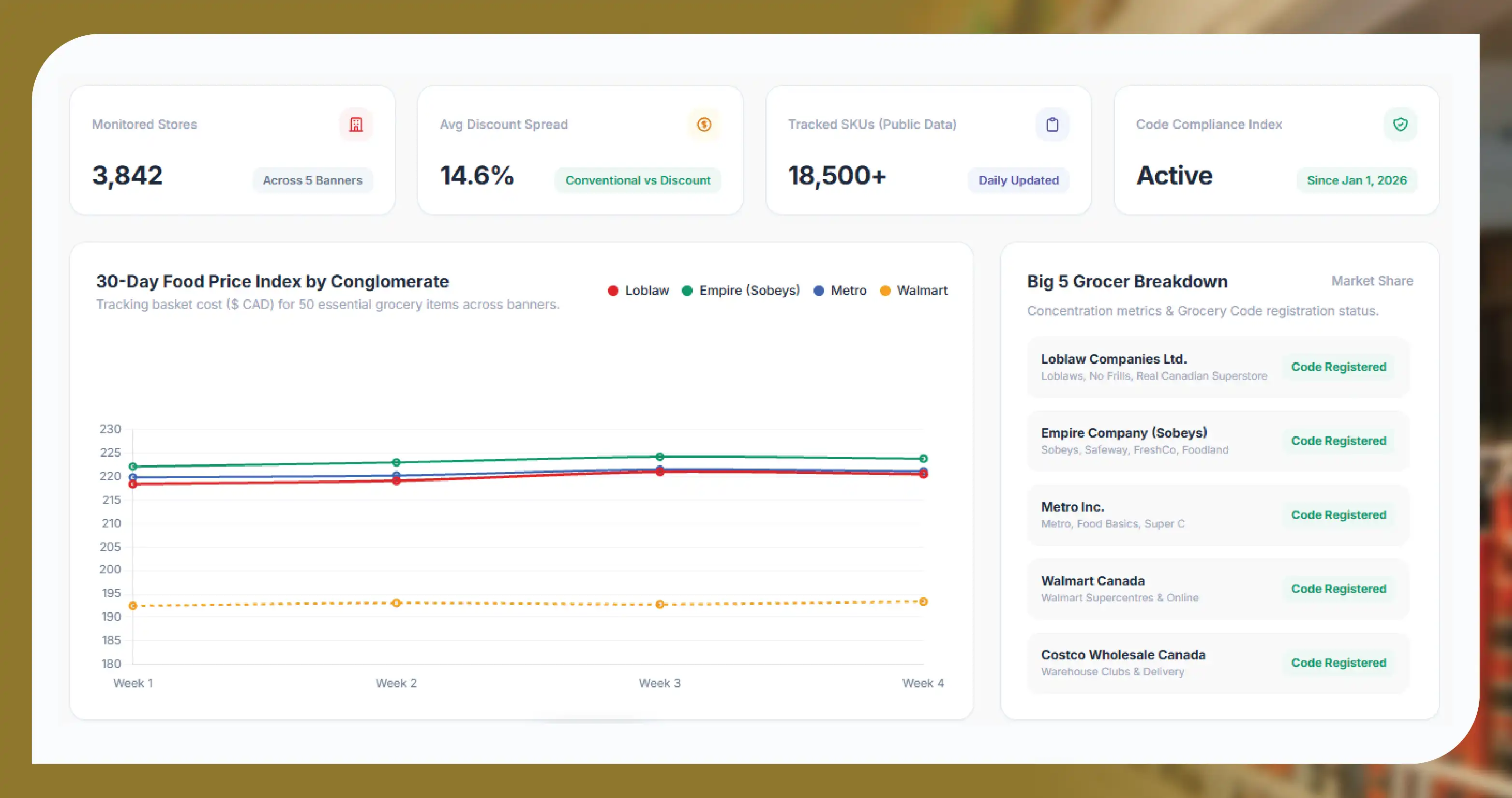
Most Canadian grocery banners roll up to a few parent companies. For Canada grocery price data, knowing the hierarchy matters, because banners under one parent often share a website platform, product IDs and private labels.
- Loblaw Companies: more than 2,800 locations including franchisees and over 18 million PC Optimum members (Loblaw, June 2026). Banners include Loblaws, No Frills, Real Canadian Superstore, Zehrs, Fortinos, Maxi and Provigo. Online orders run through PC Express.
- Empire Company (Sobeys): 1,600+ stores in all 10 provinces (Empire Q1 F2026 factsheet). Banners include Sobeys, Safeway, IGA, FreshCo, Foodland and Thrifty Foods, with Voilà for online delivery and Scene+ for loyalty.
- Metro Inc.: some 1,000 food stores in Québec and Ontario under Metro, Metro Plus, Super C, Food Basics, Adonis and Première Moisson (Metro).
- Walmart Canada: 401 stores as of 31 July 2026 – 345 Supercentres and 56 discount stores – with a large grocery range.
- Costco Canada: membership warehouses selling bulk packs; prices are useful for per-unit benchmarks.
- Regional and specialty grocers: for example Pattison Food Group banners in Western Canada, Co-op stores and Asian grocers such as T&T Supermarket.
The platforms that matter and how they differ
Canada grocery price data comes from three kinds of public sources: retailer websites, third-party delivery marketplaces and weekly flyers. Each behaves differently.
| Platform / source | Parent / banners | Price scope | What to watch |
|---|---|---|---|
| PC Express (Loblaws, No Frills, Superstore, Maxi, Provigo) | Loblaw | Store-specific, set by selected pickup store | Same product ID across banners; prices differ by banner and store |
| Sobeys / IGA / Safeway / FreshCo sites | Empire | Store or region specific | Flyer-led pricing; Québec IGA has its own site |
| Voilà by Sobeys | Empire | Delivery area by postal code | Online-only prices can differ from in-store |
| Metro / Food Basics / Super C sites | Metro Inc. | Store specific | Bilingual pages in Québec; strong flyer focus |
| Walmart.ca grocery | Walmart Canada | Store or postal code | Rollback and clearance flags |
| Costco.ca | Costco Canada | Mostly national online; warehouse prices vary | Bulk pack sizes; no reliable item-to-UPC mapping |
| Instacart Canada | Many retailers | Store specific, may include marketplace markup | Compare with retailer's own site before use |
| Weekly flyers | All major banners | Region or store, Thursday or Friday cycles | Promo price, valid-from and valid-to dates |
For marketplace-specific pipelines, see our guide to weekly grocery price scraping from Instacart Canada and our Voilà by Sobeys data scraping page.
The 12 data fields to collect for Canada grocery price data
A good Canada grocery price data schema keeps price, product and place separate, so the same item can be compared across stores and over time.
- Retailer and banner: for example Loblaw / No Frills.
- Store ID and postal code (FSA): the location the price applies to.
- Province: needed for tax, deposit and regional analysis.
- Product ID: the retailer's own SKU or item code.
- UPC / GTIN: only where the retailer publishes it on the page.
- Product name (English and French): both versions where available.
- Brand and private-label flag: for example President's Choice, Compliments, Selection.
- Size and unit: pack size, unit of measure and pack count.
- Regular price: the shelf price before any offer.
- Promotion price and type: sale price, multi-buy, "was" price, flyer flag and dates.
- Unit price: price per 100 g, kg, L or each, as displayed or calculated.
- Availability and timestamp: in stock or not, plus the collection date and time.
| Field | Example value | Notes |
|---|---|---|
| retailer_banner | No Frills | Map to parent group |
| store_postal_fsa | L8P | Forward sortation area only |
| province | ON | Two-letter code |
| product_name_en / product_name_fr | Whole Milk 3.25% / Lait entier 3,25 % | French often primary in Québec |
| pack_size | 2 L | Normalise to millilitres |
| regular_price_cad | Decimal, 2 places (CAD) | Public shelf price |
| promo_price_cad | Decimal, 2 places; blank if no offer | Flyer or online offer |
| promo_valid_to | ISO date, YYYY-MM-DD | From flyer or page |
| loyalty_offer_flag | true | Public offer text only, no member pricing |
| captured_at | 2026-10-12T09:00-04:00 | Local time zone |
Why prices differ by province, postal code and channel
The same product can have several prices in Canada at the same moment. Plan your Canada grocery price data around this from day one:
- Banner strategy: discount banners such as No Frills, FreshCo, Food Basics and Super C usually price below full-service banners from the same parent.
- Store and postal code: PC Express, Voilà and Walmart.ca ask for a store or postal code before showing prices. Your scraper must set the location for every request.
- Province: sales tax on some grocery items, bottle deposits and regional supply chains change the final price. Collect pre-tax shelf prices and record the province.
- Channel: online delivery prices, marketplace prices on Instacart and in-store prices may not match.
- Flyer cycles: most weekly flyers turn over on Thursday or Friday, so a Wednesday capture and a Thursday capture can tell different stories.
Loyalty pricing. PC Optimum and Scene+ offers are often personalised. Collect only prices and offers shown publicly to all visitors, such as "Earn 2,000 points" text on a product page. Never log in or collect member-only or personalised prices.
Bilingual data in Québec. Maxi, Provigo, IGA, Metro and Super C publish French-first pages. Store both languages in your Canada grocery price data and match on brand, size and UPC rather than on name text alone. Québec is also the only province where unit pricing is legally required, according to the Competition Bureau study.
How to collect, clean and match the data
Here is the workflow we use for Canada grocery price data projects.
- Define the basket. Start with a list of products, categories and stores or postal codes. A 200-item basket across five banners in three cities is a common pilot size.
- Set the location. Pick store IDs or postal codes for every banner, such as a specific Sobeys in Halifax.
- Collect at a fixed cadence. Daily for price-comparison apps; weekly, timed after the flyer change, for CPG and analyst tracking.
- Normalise. Convert sizes to grams or millilitres, split multi-buy offers into a per-unit price, and standardise French decimal commas.
- Match products. Use a tiered approach:
- UPC / GTIN match where the retailer shows a barcode.
- Retailer ID match across banners of the same parent (for example the same Loblaw product ID on Loblaws and No Frills).
- Brand + name + size match with fuzzy text scoring and a confidence score.
- Manual review for low-confidence pairs and private labels, which only have "comparable" items, not exact matches.
- Quality check. Flag price jumps above a set threshold, missing sizes and out-of-stock items before delivery.
- Deliver. CSV, JSON, an API or a dashboard; see our real-time price monitoring service.
A note on Costco: Costco Canada pages do not reliably expose UPCs, and bulk packs rarely match supermarket sizes. Treat Costco as a per-unit price benchmark, not a UPC-matched source.
Use cases
- Price-comparison apps: use Canada grocery price data to show shoppers the cheapest store for a basket near their postal code, refreshed daily.
- CPG shelf and promotion tracking: monitor regular price, promo depth and flyer frequency for your brand and competitors by banner.
- Retail competitive pricing: benchmark a store against the nearest discount and full-service competitors.
- Shrinkflation monitoring: track pack size and unit price over time for the same product ID.
- Food inflation research: build a product-level index by province to compare with the Statistics Canada CPI and its average retail price table.
- Private-label analysis: compare President's Choice and No Name against Compliments and Selection on unit price.
| Use case | Typical cadence | Key fields | Matching level |
|---|---|---|---|
| Price-comparison app | Daily | Store, regular price, promo, availability | UPC + name/size |
| CPG promotion tracking | Weekly, after flyer change | Promo price, promo dates, flyer flag | Retailer ID / UPC |
| Analyst inflation index | Weekly or monthly | Unit price, province, size | Fixed product list |
| Retail benchmarking | Daily or weekly | Store, price, unit price | Comparable items |
Legal and compliance basics
For Canada grocery price data, collect only publicly available prices and product details. Review each site's terms of service and robots.txt, respect rate limits and avoid putting load on retailer servers. Do not bypass logins, CAPTCHAs or other access controls, and do not collect personal data or personalised loyalty prices. PIPEDA and provincial privacy laws apply to personal information, which a price feed should never contain. [Compliance: legal team to review wording on Canadian law and site terms before publishing.]
Build vs buy: choosing a provider
Building Canada grocery price data feeds in-house can work for one banner and a small basket. It gets harder as you add store-level location settings, flyer cycles, French pages, anti-bot changes and cross-banner matching.
| Factor | Build in-house | Buy from a data provider |
|---|---|---|
| Setup time | Weeks per platform | Pilot sample in days |
| Maintenance | Your team fixes breakages | Provider monitors and repairs |
| Coverage | Usually one or two banners | Multi-banner, multi-province |
| Matching | Built from scratch | Existing matching workflow plus review |
| Cost model | Engineering time and infrastructure | Subscription or per-feed pricing |
When choosing a provider, ask about store-level coverage, flyer capture, bilingual handling, match confidence scores, delivery formats and compliance practices. Food Data Scrape covers Canadian grocery, restaurant and alcohol platforms; see our Canada coverage page and a Sobeys sample dataset.
Get a free sample of Canada grocery price data for your basket, banners and postal codes.
Questions
Frequently Asked Questions
Official averages come from Statistics Canada's CPI and monthly average retail price tables. For store-level, product-level prices across Loblaws, Sobeys, Metro and Walmart Canada, you need data collected from public retailer websites, apps and flyers.
Yes. Sobeys, Voilà, PC Express and Walmart.ca show prices for a chosen store or postal code, so a feed can be set up for specific stores.
Only public offers that every visitor can see. Personalised or member-only loyalty prices require a login and should not be collected.
By UPC where published, by retailer product ID within the same parent group, and by brand, name and size with confidence scoring, plus manual review.
Promotions usually follow weekly flyer cycles, while regular prices change less often. Daily collection suits apps; weekly collection suits most analysis.
Collecting public price data is common practice, but you must follow each site's terms, robots.txt and rate limits and avoid personal data. Get legal advice for your specific use.
Get a Free Food Data Sample in 48 Hours.
Tell us your platforms, target markets and required fields — we'll map exactly what's possible with food data scraping, recommend the right approach, and send a working sample so you can verify quality before any commitment.
Request a strategy call
Thanks — our data team will reach out within 48 hours with your sample.