Introduction
Wine is one of the hardest products to catalogue. The same wine comes in many vintages, sizes and label spellings, and its ratings and prices change every year. That is why importers, retailers and app builders keep asking how to build a wine database that stays accurate.
How do you build a wine database? Define who will use it, pick public sources (ratings sites, retailers, winery pages and label registries), store wineries, wines, vintages, ratings and prices in linked tables, match records with a standard ID such as LWIN, refresh on a set schedule and keep only data you are allowed to use.
This guide walks through each step, from sources and data model to matching, refresh cadence, compliance and the build-or-buy decision.
Who needs a wine database and why?
The market is under pressure, which makes good data more valuable. The OIV reports world wine consumption of 208 million hectolitres in 2025, down 2.7%, and US wine imports of €5.5 billion, down 12% (OIV). When demand is soft, buyers need to know which wines earn high ratings at fair prices.
- Importers and distributors compare ratings and shelf prices before choosing new wineries to bring in.
- Retailers check competitor prices by vintage and spot gaps in their range.
- Wine apps and marketplaces need clean wine, vintage and winery records to power search and recommendations.
- Restaurants and sommeliers track list prices and ratings for wines they pour.
- Analysts and investors follow price and rating trends by region and grape.
Which sources should a wine database use?
No single site holds everything. A strong wine database combines community ratings, retailer prices, producer facts and official label data. The table compares the main public source types and their limits.
| Source type | Examples | Public data you can use | Limits to respect |
|---|---|---|---|
| Community rating apps | Vivino | Average rating, rating count, region, grape, price shown | Store ratings and counts, not full user reviews |
| Price search engines | Wine-Searcher | Average listed price, number of offers, region, grape | Some data is behind paid plans; do not bypass |
| US retailers | Total Wine & More, Wine.com | Shelf price, size, vintage, ABV, stock, rating count | Prices are store or state specific |
| Winery websites | Producer pages | Technical sheets, varietal mix, ABV, vineyard facts | Brand text is copyrighted; summarise facts |
| Critic publications | Major wine magazines and critics | Public headline scores where openly shown | Most scores and notes sit behind paywalls |
| Label registries | TTB COLA Public Registry | Brand, class/type, label approvals and images | Label data, not prices or ratings |
The US TTB COLA Public Registry is useful for producer and label facts. TTB says no registration or password is needed, and label images are available for approvals issued from 1999 onward.
If you want ready records instead of starting from zero, our Vivino dataset and Wine-Searcher prices dataset cover two of these source types.
The 12 data fields every wine database needs
Design the model around four linked levels: winery, wine, vintage and offer. Ratings and prices attach to the vintage, not the wine, because a 2019 and a 2021 can differ a lot. These are the fields we recommend:
- winery_name – the producer, with country and region.
- wine_name – the cuvée or label name, cleaned of size and vintage.
- vintage – the harvest year, or NV for non-vintage.
- varietal – grape or blend, with percentages when published.
- region / appellation – for example Napa Valley AVA or Rioja DOCa.
- color_style – red, white, rosé, sparkling, fortified or dessert.
- abv_percent – alcohol by volume from the label or tech sheet.
- bottle_size_ml – 375, 750, 1500 and so on.
- rating_avg and rating_count – per source, with the source name.
- tasting_attributes – short tags such as "dark fruit" or "oaky", not copied review text.
- price_usd and retailer – shelf price per offer, with store or state.
- lwin and source_url – the standard ID plus a link back to each source.
| Table | Key | Main fields | Updated |
|---|---|---|---|
| winery | winery_id | name, country, region, website | Rarely |
| wine | wine_id, lwin (7-digit) | winery_id, wine_name, color_style, varietal, appellation | Rarely |
| vintage | lwin (11-digit) | wine_id, vintage, abv_percent | Each new release |
| rating | vintage + source | rating_avg, rating_count, tasting_attributes, captured_at | Monthly |
| offer | vintage + retailer + size | price_usd, bottle_size_ml, stock, store, captured_at | Weekly |
How to handle tasting notes. Tasting notes are the hardest field to store well. Instead of saving full paragraphs, turn them into a short, fixed list of tags: fruit (red, dark, citrus, tropical), oak (none, light, heavy), body (light, medium, full), sweetness and acidity. Keep the tag list small, record which source each tag came from, and review a sample by hand each month so the tags stay consistent as new wines arrive.
How do you match wine names and vintages?
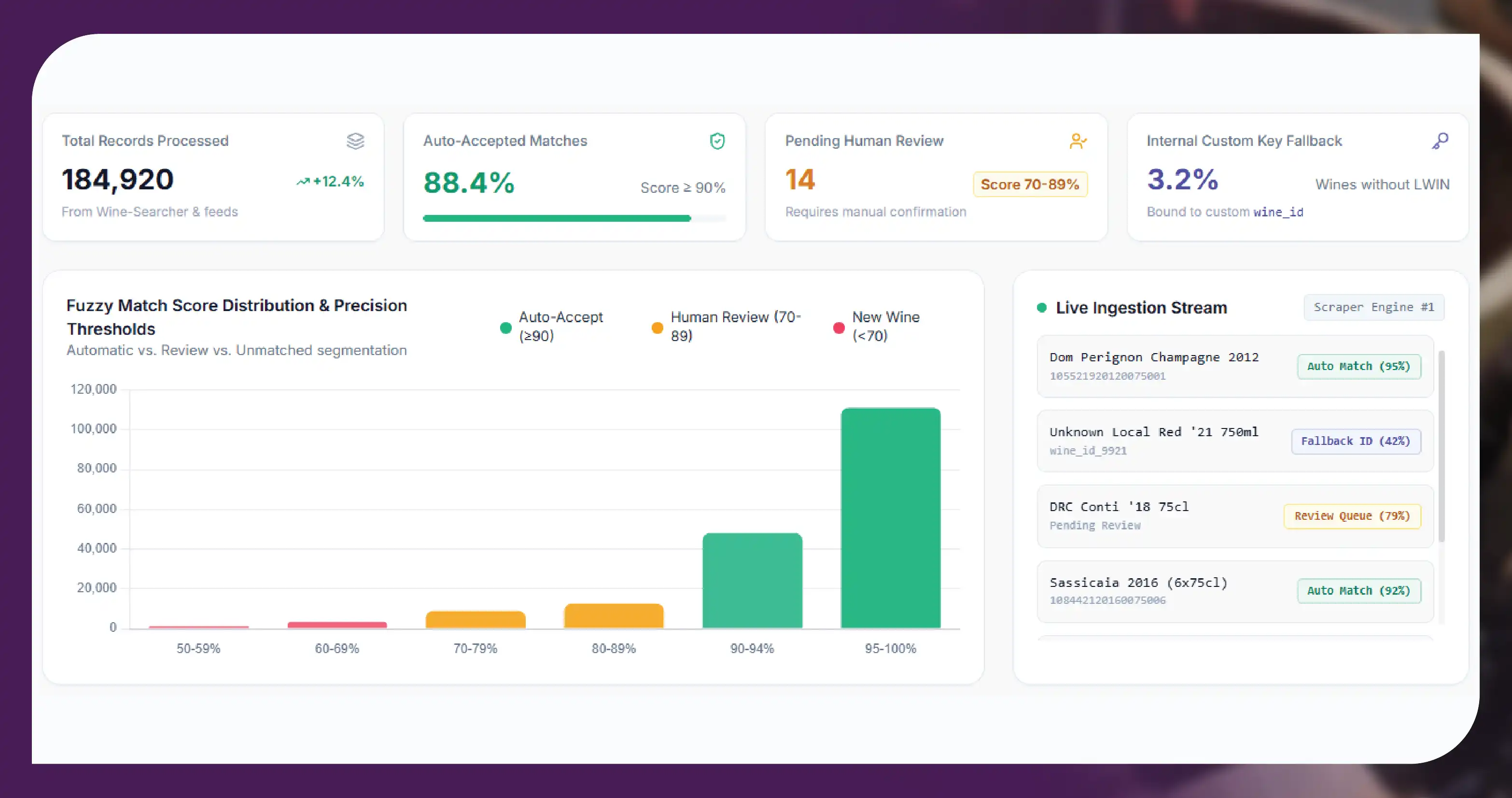
Matching is where most wine database projects fail. One retailer writes "Ch. Margaux 2015 750ml", another writes "Chateau Margaux, Margaux 2015". Without a shared key, you end up with duplicates and wrong prices.
The Liv-ex Wine Identification Number (LWIN) solves much of this. Liv-ex says LWIN covers over 200,000 wines and spirits and is free to download and use under a Creative Commons licence (Liv-ex LWIN). The 7-digit code identifies the wine, 11 digits add the vintage, 16 digits add bottle size and 18 digits add pack size.
- Clean first. Strip sizes, vintages and abbreviations from names before matching; expand "Ch." to "Chateau" and remove accents for comparison.
- Match on several fields. Combine winery, wine name, appellation and color, not name alone.
- Use fuzzy scores with review. Auto-accept high-confidence matches and send the rest to a person.
- Assign LWIN where possible. Keep your own wine_id for wines LWIN does not yet cover.
- Keep vintage separate. Never merge two vintages into one record, even if prices look similar.
Our page on scraping wine prices per vintage from Wine-Searcher shows how vintage-level price records can be captured.
How often should you refresh each part?
Not every field changes at the same speed. Refreshing everything daily wastes effort and puts load on source sites. Set a cadence per data type.
| Data type | Typical change speed | Suggested refresh |
|---|---|---|
| Winery and wine facts | Slow | Quarterly, or on new release |
| New vintages and labels | Seasonal | Monthly; check COLA approvals |
| Ratings and rating counts | Gradual | Monthly |
| Tasting attribute tags | Gradual | Monthly or quarterly |
| Retail prices and stock | Fast | Weekly; daily for promotions or allocations |
For US retailers, a weekly price run usually balances freshness and cost. Our Total Wine dataset is one example of retailer-level wine and spirits data.
Step by step: building your first version
A first version should be small enough to check by hand and good enough to show users. This sequence works for most teams:
- Pick one use case. For example, price comparison for 500 Napa and Sonoma reds, or a rating lookup for an app.
- Choose two or three sources. One rating source, one or two retailers, plus the COLA registry for label facts.
- Collect a sample. Capture a few hundred records and check every field against the live page.
- Clean and match. Standardise names, split vintage and size, then assign LWIN or your own ID.
- Load into linked tables. Use a relational database or a spreadsheet with clear keys while you test.
- Review and schedule. Fix gaps, then set weekly price runs and monthly rating runs.
Once the first version holds up, add regions, retailers and history step by step. Keeping each source in its own column means you can drop or replace one without rebuilding the rest.
Legal and compliance basics
A wine database must be built on data you are allowed to collect and reuse. Keep these rules in place from day one:
- Public pages only. Do not log in, bypass paywalls or break CAPTCHAs. Many critic scores and full tasting notes are paid content; license them or leave them out.
- Respect site rules. Follow robots.txt, terms of service and sensible rate limits.
- Do not copy review text. Reviews and tasting notes are protected writing. Store ratings, counts and short attribute tags, and link back to the source.
- No personal data. Skip reviewer names, profile photos and user IDs.
- Label the source. Keep source_url and captured_at on every record so users know where a rating came from and when.
Should you build or buy a wine database?
Building in-house gives full control but needs scrapers, matching logic, storage and ongoing fixes when sites change. Buying or outsourcing gets you clean data faster, and your team can focus on the product.
- Build if wine data is your core product and you have engineers to maintain crawlers and matching.
- Buy a ready dataset if you need a one-off catalogue or a starting point to test an idea.
- Use a managed feed if you need weekly prices and monthly ratings across several sources without running the pipeline yourself.
- Mix both by buying the base catalogue and adding your own private data, such as your stock and cost prices.
In our wine and spirits catalogue work, most teams start with a sample from one or two sources, check the fields and matching, then add retailers. Coverage and record counts for each source are confirmed per project.
Get a free sample dataset. Tell us which wine sources, regions and fields you need, and we will send a free sample with matched vintages and prices.
Questions
Frequently Asked Questions
A structured set of linked records on wineries, wines and vintages, with ratings, grape, region, ABV, bottle size and retailer prices, kept up to date for search, pricing or analysis.
You can collect publicly shown ratings and rating counts while respecting the site's terms and rate limits. Do not copy full user reviews or collect reviewer personal data.
It is the Liv-ex Wine Identification Number, a free standard ID. Seven digits identify the wine, 11 add the vintage, and 16 and 18 add bottle and pack size.
Only where they are openly published or you hold a licence. Many critic scores sit behind paywalls, so store short attribute tags and link back instead of copying text.
Weekly works for most retail price tracking. Ratings and winery facts change slowly, so monthly or quarterly refreshes are usually enough.
Get a Free Food Data Sample in 48 Hours.
Tell us your platforms, target markets and required fields — we'll map exactly what's possible with food data scraping, recommend the right approach, and send a working sample so you can verify quality before any commitment.
Request a strategy call
Thanks — our data team will reach out within 48 hours with your sample.