Introduction
Grocery price data for meal planning is store-level product information (shelf price, promo price, unit price, pack size and availability) that an app uses to turn recipes into priced shopping baskets. Good data is matched to recipe ingredients, tied to a store or postcode, refreshed on a set schedule and delivered as an API, feed or dataset.
Shoppers still watch every line on the receipt. The USDA Economic Research Service forecasts US food-at-home prices to rise 2.4% in 2026, with a forecast interval of 1.8% to 3.0% (USDA ERS, updated 25 September 2026). In the UK, food and non-alcoholic beverage inflation was 1.3% in the 12 months to August 2026 (ONS). In Canada, prices for food purchased from stores rose 2.8% year over year in August (Retail Insider, reporting Statistics Canada).
This guide is for product leads and developers building meal-planning, budgeting, comparison or AI grocery-agent apps in the US, UK and Canada. It covers the fields you need, where public prices live, how to match products to recipes, and how to choose a delivery format.
Why grocery prices matter to meal-planning and budgeting apps
A meal plan without prices is a list of ideas. With prices, it becomes a budget the user can act on. Over the past week our team has had requests from US, UK and Canadian app builders, including an AI meal-planning agent, two grocery comparison apps and a meal-budgeting tool.
Their needs overlap more than you might expect:
- Budget-first planning: users set a weekly spend, and the app picks recipes that fit it at their local store.
- Cheapest-basket comparison: the app prices the same shopping list across two or more retailers.
- Deal-aware menus: recipes are suggested around what is on promotion this week.
- AI grocery agents: an assistant builds the plan, checks prices and stock, and hands over a ready cart or list.
Each of these depends on prices that are local, current and correctly matched to the ingredient. A national average price does little for a user standing in a specific store.
Which retailers and sources matter in the US, UK and Canada?
Most apps start with the two or three retailers where their users actually shop, then widen coverage. Before any collection, check whether the retailer or platform offers an official route. For example, the Instacart Developer Platform lets developers create recipe pages and shopping lists that map to products at nearby retailers (Instacart Docs). Where no official route covers your fields, publicly visible product pages are the usual source.
| Country | Typical sources (public pages) | Price varies by | Notes for app builders |
|---|---|---|---|
| USA | Walmart, Kroger and banners, Aldi, Target, Instacart storefronts | Store and ZIP code | Prices and stock differ by store; Instacart storefront prices can differ from in-store shelf prices |
| UK | Tesco, Sainsbury's, Asda, Morrisons, Aldi, Lidl, Ocado | Mostly national, some store-level promos | Loyalty prices (Clubcard, Nectar) sit next to standard prices and need their own field |
| Canada | Loblaws / PC Express, Real Canadian Superstore, No Frills, Metro, Sobeys / Voilà, Walmart Canada | Store and postal code | Banner pricing differs inside one group; bilingual product names in some regions |
The biggest structural difference is pricing scope. US and Canadian prices are often store-specific, so the store or ZIP / postal code must travel with every price. Many UK grocers price nationally, but loyalty-member prices change the real cost of a basket.
The 10 data fields a meal-planning app needs
Here is the core schema we recommend for grocery price data for meal planning. Every field comes from the public product page or store selector.
- Retailer and store ID: which banner and which store the price applies to.
- Location key: ZIP code, UK postcode district or Canadian postal code used to select the store.
- Product name and brand: the exact public title, kept unedited.
- Pack size and unit: for example 500 g, 2 L or 12 count, parsed into a number and a unit.
- Regular price: the standard shelf or online price.
- Promo or sale price: with promo text such as "2 for $5" and valid-until date where shown.
- Loyalty or member price: Clubcard, Nectar, PC Optimum offers or similar, where shown publicly.
- Unit price: price per kg, per litre or per item, as displayed or calculated.
- Availability: in stock, out of stock or limited, by store.
- UPC / EAN and nutrition: barcode, ingredients, allergens and nutrition panel where the retailer publishes them.
| Field | Example value | Why the app needs it |
|---|---|---|
| store_id | 01234 | Ties price to the user's chosen store |
| postal_code | M5V 2T6 | Picks the correct local price |
| product_name | Large white eggs, 12 count | Shown to the user in the list |
| pack_size_value / unit | 12 / count | Lets the app calculate cost per recipe portion |
| regular_price | 4.29 | Baseline for budgets |
| promo_price / promo_text | 3.79 / Save 50¢ | Powers deal-aware menus |
| unit_price | 0.36 per egg | Fair comparison across pack sizes |
| in_stock | true | Avoids suggesting items the store cannot supply |
| gtin | 0062xxxxxxxxx | Matches the same product across retailers |
| scraped_at | 2026-10-14T06:00:00Z | Tells the app how fresh the price is |
How do you match grocery products to recipe ingredients?
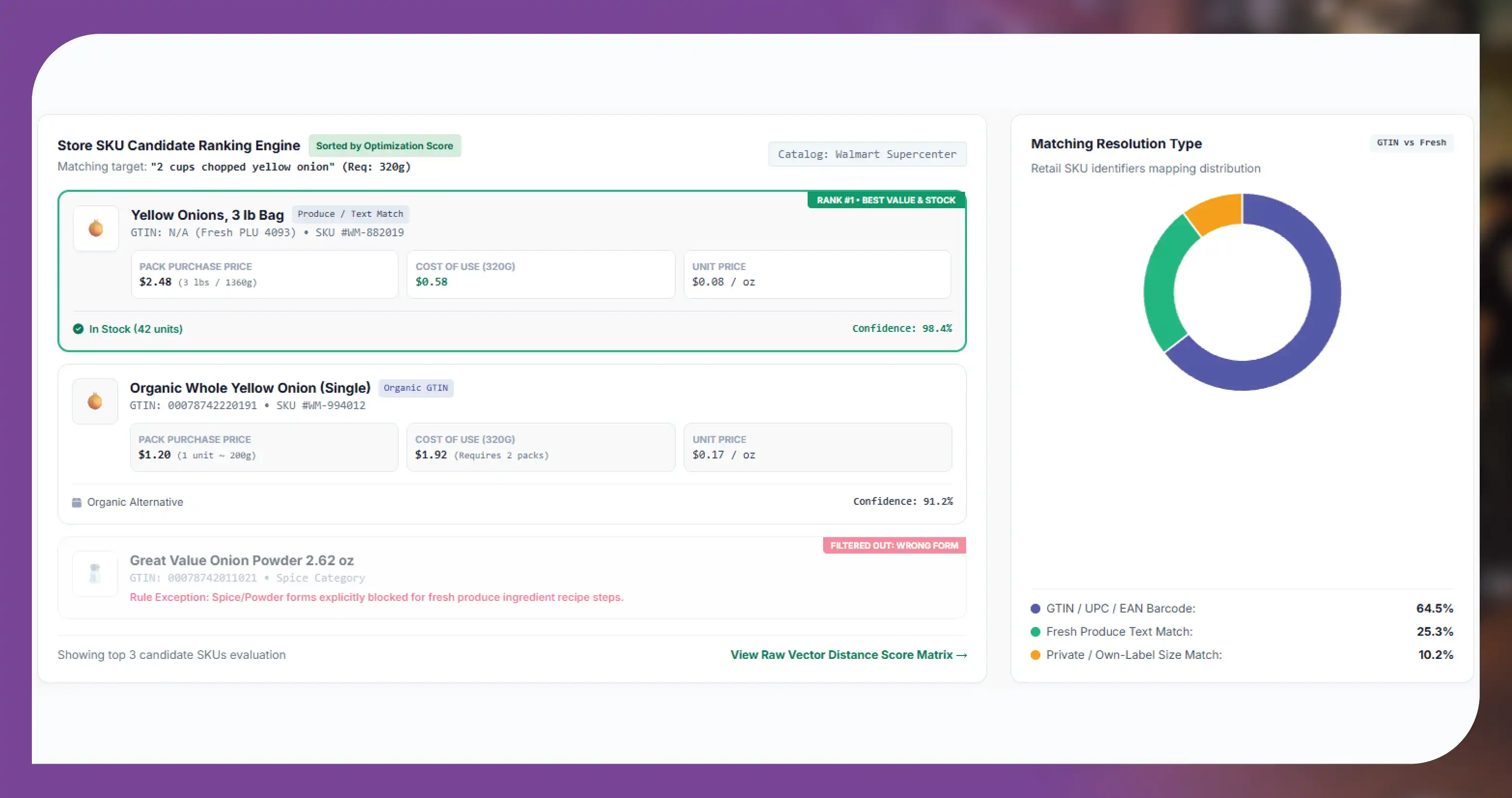
Matching is where most meal-planning projects succeed or stall. A recipe says "2 cups chopped onion". A store sells "Yellow Onions, 3 lb bag". Your app has to bridge that gap in a way users trust.
A practical matching pipeline looks like this:
- Normalise the ingredient: strip preparation words ("chopped", "fresh") and convert the amount to grams, millilitres or a count.
- Map to a canonical ingredient: link "scallions" and "green onions" to one ingredient ID.
- Find candidate products: search the store's catalogue by category and keyword, then filter out the wrong forms (onion powder is not an onion).
- Rank candidates: prefer the cheapest unit price, the user's brand or diet preferences, and in-stock items.
- Calculate the cost of use: price the quantity the recipe uses, and separately the pack the user must buy.
- Store a confidence score: low-confidence matches go to manual review or ask the user to confirm.
Barcodes help across retailers. A GTIN (UPC in North America, EAN in the UK) links the same branded item at Walmart and Kroger or at Tesco and Sainsbury's. Fresh produce and own-label lines rarely share codes, so they need text and size matching instead.
Keep the raw product title, the parsed size and the match decision side by side. When a user reports "wrong product", your team can see why the match happened and fix the rule.
Refresh cadence and delivery: API vs dataset vs feed
How often you refresh depends on what changes in your categories and how your app uses the price. Shelf prices move less often than promotions and stock.
| Data element | Suggested refresh | Delivery that fits |
|---|---|---|
| Regular shelf price | Weekly, or daily for key staples | Scheduled feed or dataset |
| Promo / sale price | Daily, plus on promo start days | Scheduled feed |
| Availability by store | Daily or several times a day for fast movers | API or frequent feed |
| Pack size, GTIN, nutrition | Monthly, or when a product is new | Dataset refresh |
| Store list and postcodes served | Monthly | Dataset |
The three delivery options suit different stages of a product:
- Dataset: a one-off or periodic file (CSV, JSON, Parquet). Best for prototypes, model training and building your ingredient-to-product map.
- Scheduled feed: files or database loads on a fixed schedule into S3, BigQuery, Snowflake or similar. Best for production apps that refresh baskets overnight.
- API: your app requests prices for a store and product list on demand. Best when users pick any store and expect current results. See our grocery pricing API for apps and scheduled feeds.
Many teams combine them: a dataset for the catalogue, a daily feed for prices and an API call for availability right before checkout.
Making grocery data ready for LLMs and AI grocery agents
AI grocery agents read data differently from a classic app. They reason over text, call tools and need to explain choices to a user. A few habits make store price records much easier for an agent to use:
- Flat, typed JSON: one product per record, with numbers as numbers and units as separate fields.
- Clear field names and units: "unit_price_per_kg" is easier for a model than "up".
- Freshness on every record: a timestamp lets the agent say "price checked this morning".
- Stable IDs: retailer, store and product IDs let the agent repeat a query or build a cart link.
- Short descriptions, not page dumps: send the fields the agent needs, not the full HTML.
These records can sit behind a tool call or a search index. The agent asks "cheapest 1 kg rice at store 01234", and gets a short, structured answer it can quote and cite.
Use cases we see from app builders
All examples are anonymised and describe requirements only.
- US AI meal-planning agent: an assistant that builds weekly plans from Instacart storefront products, needing price, pack size and availability by store. With this data, the agent can swap out-of-stock items and quote a plan cost per store.
- UK grocery comparison app: basket comparison across major UK supermarkets with regular, promo and loyalty prices kept in separate fields. This lets the app show shoppers which price they will pay with or without a loyalty card.
- Canada price-comparison app: store-level prices across national banners by postal code, with English and French product names. This lets one product record serve both language versions of the app.
- US meal-budgeting tool: Walmart grocery prices by ZIP code to fit weekly recipes inside a set budget. ZIP-level prices let the tool flag when a recipe goes over budget in a given area.
These examples describe the requirements teams brought to us; the outcomes each app sees depend on its own users and pricing model.
Legal and compliance basics
Grocery price data should come only from publicly available business information. A responsible setup follows a few rules:
- Public pages only: no logins, no paywalled areas and no bypassing CAPTCHAs or other security.
- Respect site rules: follow robots.txt, terms of service and sensible rate limits.
- No personal data: collect product and store data, never shopper accounts, reviews tied to people or order histories.
- Use official routes first: where a retailer or platform offers an API or partner programme that covers your needs, use it.
- Label prices honestly: show "price checked at" times and note that in-store prices may differ.
Rules vary by country and by retailer, so take your own legal advice before launch.
Build vs buy: choosing a grocery data provider
Building in-house gives full control, but each retailer site changes often, and store-level pricing multiplies the work by every location you cover. Buying data lets your team focus on matching, ranking and user experience.
When you compare providers, ask:
- Which retailers, banners and countries are covered, and at store or national level?
- Are regular, promo, loyalty and unit prices kept as separate fields?
- Do records include GTIN, pack size and a timestamp?
- What refresh cadence and delivery formats are available?
- How are failed or partial collections reported?
- Can you start with a free sample for your own stores and recipes?
Food Data Scrape covers grocery data across the US, UK, Canada and more, with platform pages for Walmart and Tesco, and a product barcode and UPC dataset for cross-retailer matching.
Get a free sample dataset: tell us your app's stores, postcodes and a few recipes, and we will send matched, priced sample records.
Questions
Frequently Asked Questions
It is store-level product data, including price, promo, unit price, pack size and availability, that an app uses to cost recipes and build shopping lists. It is most useful when tied to a store or postcode and matched to ingredients.
Weekly works for many shelf prices. Promotions and availability usually need a daily refresh, and fast-moving items may need several updates a day. Match the cadence to how your app uses each field.
Yes, for retailers that show local prices on public pages. In the US and Canada prices often differ by store, so each record should carry the store ID and ZIP or postal code. Many UK grocers price nationally.
They normalise the ingredient and quantity, map it to a canonical ingredient, search the store catalogue, rank candidates by unit price and preferences, and store a confidence score. Barcodes help for branded items.
Collecting publicly available product and price data is common, but you must respect each site's terms, robots.txt and rate limits, avoid personal data and never bypass logins or security. Get legal advice for your markets.
Use a dataset to prototype and build matching, a scheduled feed for nightly basket refreshes, and an API when users need on-demand prices for any store. Many apps use all three.
Get a Free Food Data Sample in 48 Hours.
Tell us your platforms, target markets and required fields — we'll map exactly what's possible with food data scraping, recommend the right approach, and send a working sample so you can verify quality before any commitment.
Request a strategy call
Thanks — our data team will reach out within 48 hours with your sample.